Best Of
Re: Default landing page for group
It has been requested here [https://dojo.domo.com/discussion/53076/individual-group-landing-pages] and perhaps other posts so feel free to upvote this and/or them.
 amehdad
Re: Pivot card
@eriena You could create a beast mode so calculate the sum of pcs for each product to make sure that every product is visible in the table.
For example you can create a Beast Mode called "Apple":
sum(case when `Product` = 'apple' then `pcs` else 0 end)
And this Beast Mode called "Grapes":
sum(case when `Product` = 'grape' then `pcs` else 0 end)
That way, even if there is no data for grapes in February it will still show 0.

Re: Pivot card
Hi @eriena, just in case you haven't already, you can learn more about pivot table cards here: https://domohelp.domo.com/hc/en-us/articles/360043429473-Pivot-Table.
On ordering the product names, the default option is alphabetical order but using the other arrowheads across your columns, you can sort in any order you like.
As for having empty records show, try this chart property option and see if it displays all products when February is selected.
 amehdad
Re: Last Month and Same Month Last Year
Hi @Hiraayub When I'm dealing with date comparisons like this I use a custom date dimension to easily define offsets like "last year". I've done a writeup on this in the past: https://dojo.domo.com/discussion/53481/a-more-flexible-way-to-do-period-over-period-comparisons#latest to get the value for the current date or the date from last year / last month etc.

Re: Data Table no thousands separator
It's showing the thousands separator because it's a number but it likely doesn't actually have the separator in the value. It's a display enhancement to make numbers easier to read. To do a quick test you can view the data in a table card and they shouldn't show up there.
Re: Data Table no thousands separator
😁 And two minutes later I found the answer myself.....
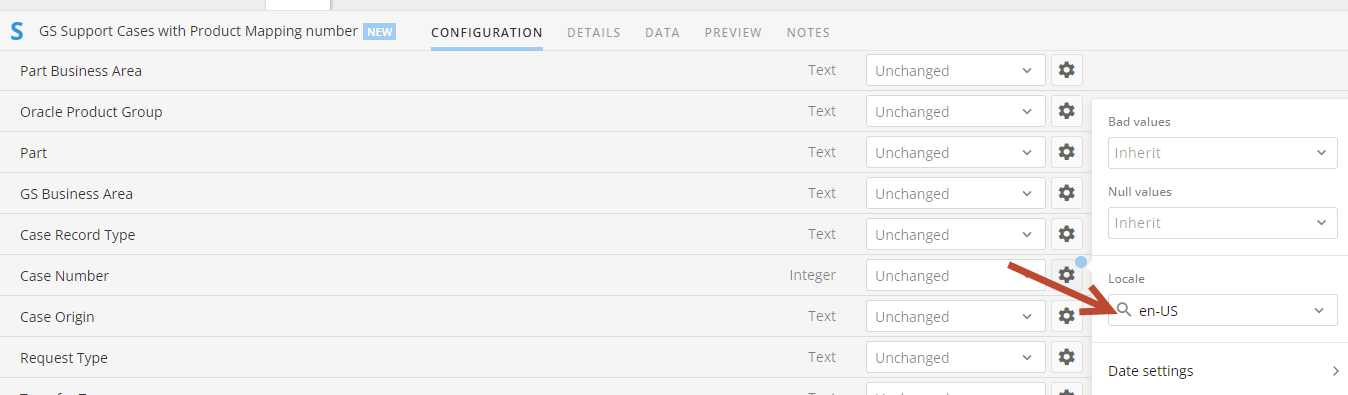
In the ETL, at the Input Data Set going to Settings for Integer and change to en-US....Does the trick...

Re: How to output list which can't be joined
Hi @eriena, is your use case related to getting a list of products that don't have an assigned shop and then you (or other users) can go back to that dataset 2 to correct/update it? If so, you can have a full outer join (i.e. giving you all the records from both tables and joining matching records where possible) setup and then add a Filter tile to only include any rows where you have a product but no shop. So it would go: Join tile -> Filter tile -> Output tile.
amehdad
Re: Is Magic ETL 2.0 able to handle more complex SQL injections?
I'd recommend using a formula tile to input your CASE statements which are inside your SUM aggregation as two separate values. Then do a group by to get the SUM then another formula tile to do the outer portion of the beast mode (checking if your denominator is 0)
Re: Is Magic ETL 2.0 able to handle more complex SQL injections?
That seemed to work. Thanks so much guys!
 Pierce13
Re: Map Only Certain Values from One Column to Another Column
I figured out what I was doing wrong - thanks for your help!
micheleb