Best Of
Re: Data Table no thousands separator
😁 And two minutes later I found the answer myself.....
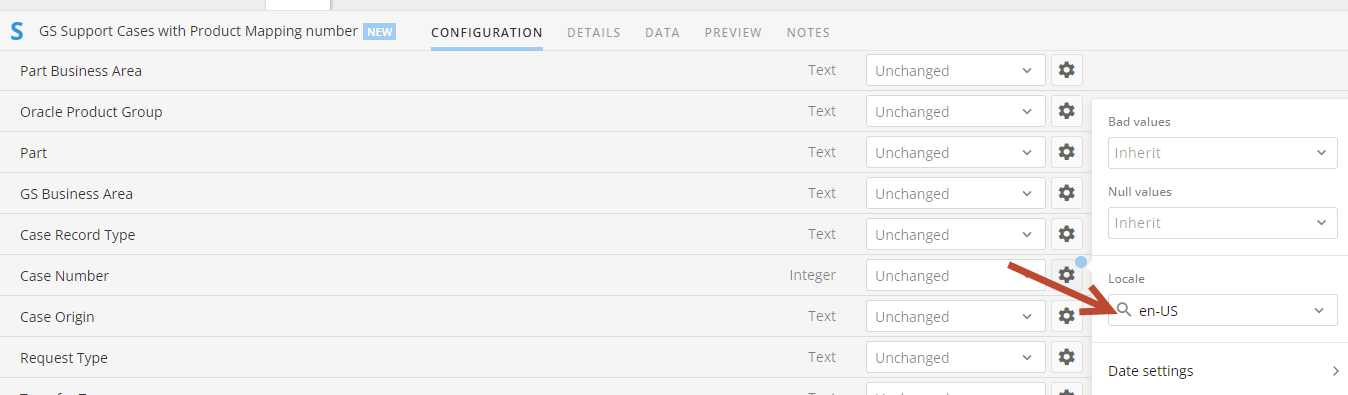
In the ETL, at the Input Data Set going to Settings for Integer and change to en-US....Does the trick...

Re: How to output list which can't be joined
Hi @eriena, is your use case related to getting a list of products that don't have an assigned shop and then you (or other users) can go back to that dataset 2 to correct/update it? If so, you can have a full outer join (i.e. giving you all the records from both tables and joining matching records where possible) setup and then add a Filter tile to only include any rows where you have a product but no shop. So it would go: Join tile -> Filter tile -> Output tile.
 amehdad
Re: Is Magic ETL 2.0 able to handle more complex SQL injections?
I'd recommend using a formula tile to input your CASE statements which are inside your SUM aggregation as two separate values. Then do a group by to get the SUM then another formula tile to do the outer portion of the beast mode (checking if your denominator is 0)

Re: Is Magic ETL 2.0 able to handle more complex SQL injections?
That seemed to work. Thanks so much guys!
 Pierce13
Re: Map Only Certain Values from One Column to Another Column
I figured out what I was doing wrong - thanks for your help!
micheleb
Re: Map Only Certain Values from One Column to Another Column
You're missing a single quote and a few back ticks (these designate column names).
CASE
WHEN `Journey-Pathway Content Progress` = 'Completed' THEN 'Completed'
ELSE `Content Progress`
END
Doing this as a beast mode will create a second column in your dataset as that's how beast modes function. You can rename your column's Display Name value clicking on the column name and changing Label value. Then you can use this new column / beast mode field in your report instead of the old column so it's only displayed once.
Re: Map Only Certain Values from One Column to Another Column
Hi @micheleb
You can use a case statement to conditionally set column B to completed if column A is completed
CASE WHEN `Progress Column A` = 'Completed' THEN `Progress Column A` ELSE `Progress Column B` END
If you don't want an extra column in your dataset from this beast mode you can use the same formula in a Formula tile in the new Magic ETL and set the column name to be the same as the existing one and it'll overwrite the value for you.
Re: I want to create a card that provides an average monthly overview
You could just set your date range selector on your new card to be Last Month and then in the column aggregation (click the column name after you add it to your card) and select Aggregation > Average.
Re: Private iframe and Clickjacking
I'd recommend reaching out to your CSM to get an official answer to this question and they can run it by their security team if necessary.
Re: How to output list which can't be joined
You wouldn’t necessarily need a full outer join as the left join would work just fine. After your join just add a filter tile to say where shop is null and then feed that into another output dataset